> ## Documentation Index
> Fetch the complete documentation index at: https://docs.duckpost.app/llms.txt
> Use this file to discover all available pages before exploring further.
# Public page
> Configure and share your DuckPost public updates page.
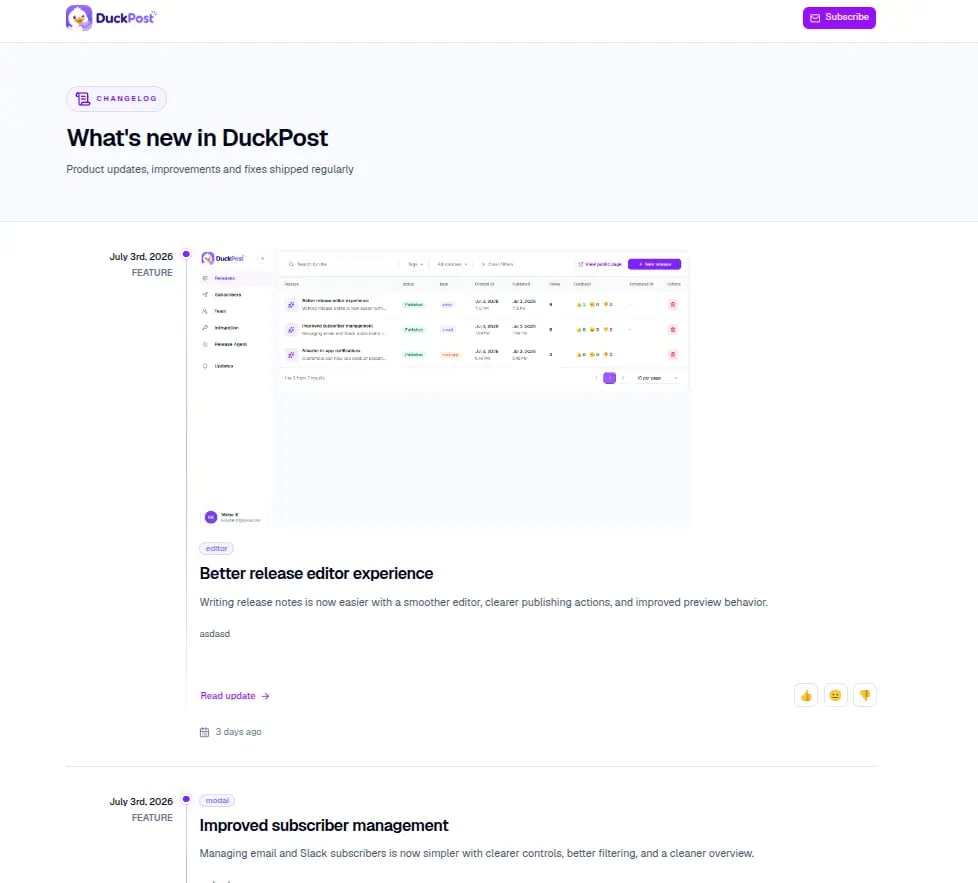
DuckPost gives every organization a hosted public changelog page for customer-facing updates. You manage its URL from [**Integration**](https://duckpost.app/integration), and customers read it under a path like:
```text theme={null}
https://duckpost.app/updates/
```
## What the public page is for
* Share a permanent updates page with customers
* Publish product updates, improvements, and fixes in one timeline
* Let customers open a full detail page for each release
* Collect email and Slack subscribers from the same surface
* Gather lightweight reaction feedback on published releases
## What customers see
The public page shows:
* Your organization name in the page header
* A timeline of published releases
* Release tags, summaries, content, and optional images
* A **Read update** link that opens the full release permalink
* A **Subscribe** flow for email and Slack
* Feedback reactions on each published release
## Public URLs
DuckPost uses two public URL patterns:
* Changelog home: `https://duckpost.app/updates/`
* Release detail page: `https://duckpost.app/updates//`
Only published releases appear on the public page.
## Slug rules
Owners can change the organization slug from [**Integration**](https://duckpost.app/integration).
* Use lowercase letters, numbers, and hyphens
* Choose a stable slug before you share it widely
* Changing the slug changes the public URL
* Old public links stop working after the slug changes
## How subscriptions work on the public page
Customers can subscribe directly from the public page:
* **Email** subscriptions use a confirmation email
* **Slack** subscriptions use an **Add to Slack** flow
After a release goes live, DuckPost can notify those subscribers if the release has notifications enabled.
## Feedback and engagement
Each public release can collect one simple reaction per visitor:
* 👍 Good feedback
* 😐 Neutral feedback
* 👎 Bad feedback
That feedback rolls back into your release engagement data in [**Releases**](https://duckpost.app/releases).
## Recommended public page flow
Open [duckpost.app/integration](https://duckpost.app/integration) and choose a stable public changelog URL.
Drafts stay private. Publish at least one release before you share the page.
Visit `duckpost.app/updates/` and confirm the branding, content, and release order look right.
Share the public page as your main changelog archive and subscription surface.
## Related pages
Start with the full integration setup and available options.
Embed the widget and show releases inside your product.
Understand email and Slack subscription delivery.